Free · macOS · Open source
Two accounts.
No logout.
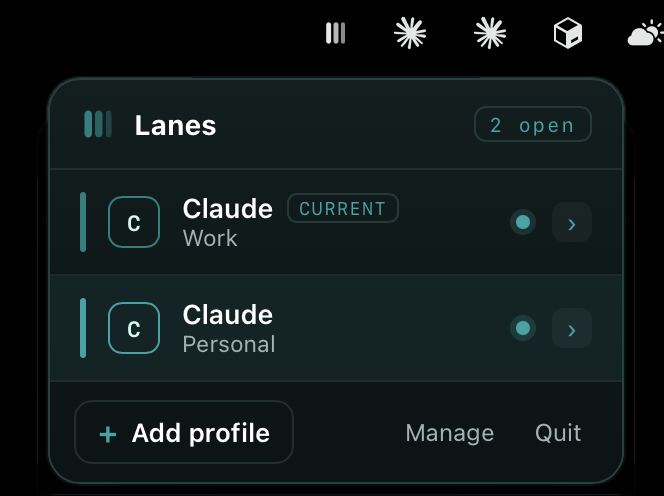
Lanes opens Claude Desktop signed into a different account in each lane, side by side. Work and personal, running at once. No more logging out a dozen times a day.
Free · macOS · Open source
Lanes opens Claude Desktop signed into a different account in each lane, side by side. Work and personal, running at once. No more logging out a dozen times a day.
Get going
No terminal. No GitHub account. No setup project. Download, drag, done.
Grab the .dmg, open it, and drag Lanes into your Applications folder. That’s the whole install.
Open Lanes from the menu bar and add a lane for each account — name them Work, Personal, whatever fits. Sign in once per lane.
Click any lane and the real app opens on that account. Click two and they run side by side. No logging out, ever.
First launch
Lanes is free and independent, so it isn’t notarized by Apple yet. macOS asks you to confirm once — a ten-second step, no terminal needed.
Open the .dmg and drag Lanes into your Applications folder, then double-click it.
macOS blocks the very first launch. Open System Settings → Privacy & Security, scroll to the bottom, and click Open Anyway.
Confirm once and Lanes opens from your menu bar. You won’t see the prompt again.
xattr -dr com.apple.quarantine /Applications/Lanes.app
Why the prompt? Apple charges for the certificate that removes it. Lanes is free and open source — read every line, or build it yourself.
Works with
Lanes launches the official app — it doesn’t replace it. Each account gets its own clean, isolated lane.
On the radar
Lanes only adds an app once it can isolate cleanly without touching your login. Claude does today; these don’t yet — and Lanes won’t fake it.
Unofficial & not affiliated with Anthropic or OpenAI. A personal-productivity utility — check your plan’s terms before running multiple accounts, especially Team or Enterprise.
Free, open source, and a 1.9 MB download. Your accounts, side by side, in a minute.